
CP6012 This product is legacy
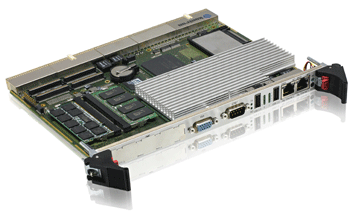
CPCI/PICMG 2.16 Intel® Core™ Duo up to 2.0 GHz (T2500) System/Peripheral CPU
Specifications
- 4HP, single slot CPU with passive cooling
- Scalable processor speed, Intel Core Duo up to 2.0 GHz
- Support of latest FSB performance with 667 MHz
- Up to 4GB DDR2 400 MHz SDRAM via two SODIMM sockets
- 4x GigEthernet Interfaces via PCIExpress
- Latest IO technology with USB 2.0 channels and SATA
- XMC/PMC + onboard HDD + CompactFlash configuration possible
- Rear I/O supporting PICMG 2.16
High-Performance, PCI Express-based computing blade
Kontron´s CP6012, a 6U CompactPCI CPU board with Intel® Core Duo processor T2500 (2 GHz), meets the highest performance demands. With its E7520 and 6300ESB chipset, it handles data throughput like a server. Compared to Intel® Pentium® M, dual-core technology allows approximately twice the performance at similar power consumption. The PICMG 2.16-compliant Kontron CP6012 is designed for bandwidth-intensive applications and, thanks to hot-swap support and IPMI (PICMG 2.9-compliant Intelligent Platform Management Interface) meets the highest demands for the management of high-availability applications. The CP6012 offers a high degree of integration and the latest interface technologies such as PCI Express, up to 4 GB/400 MHz DDR2 SODIMM RAM (6.4 GB/sec throughput) and 2x fast Serial-ATA interfaces including hard drive on board as well as a CompactFlash slot. Four Gigabit Ethernet interfaces via PCI Express (two to the backplane / two front-side), max. 4x USB 2.0, 1xCOM, VGA, and rear I/O support round out the feature set.
If you need more information about sytems or PMC/XMC modules, please follow the links systems or PMC/XMC
If you need more information about sytems or PMC/XMC modules, please follow the links systems or PMC/XMC
Features
| Chipset | Intel® E7520 and 6300ESB I/O Controller Hub |
| DRAM | up to 4 GByte with ECC, DDR2 |
| Flash Disk | CompactFlash socket |
| Frontpanel | VGA (CRT), COM1, 2x Ethernet, 1x USB, LEDs, Reset, PMC/XMC |
| USB | 4x USB 2.0 |
| Ethernet | 4x Gigabit, 2x to front, 2x to rear, PICMG 2.16 compliant |
| Graphics | ATI ES1000 (64 MByte external video memory) |
| PMC | 1x slot XMC PCIe x8 or 1x slot PMC 64-bit/66 MHz |
| System peripheral | system/stand alone |
| Rear I/O | Yes |
| IPMI | Yes (IPMI V1.5) |
| 4HP Version | VGA, COM, 2x Ethernet, 2x USB, LEDs, Reset, PMC/XMC cutout |
| Additional | Watchdog, HW monitor |
| Cache | 2 MByte |
| CPU | Intel® Core™ Duo up to 2.00GHz |
| DRAM speed | 400 MHz |
| Front Side Bus | 667 MHz |
| Temperature/Humidity | 0-60°C, 93% rel. humidity |
| Power Consumption | 1.66GHz max. 34W; 2.00GHz max 52W |
| SATA | Up to 2 SATA ports, 1 onboard SATA disk option |
Downloads
Datasheets
CP6012 Datasheet
[ ds_cp6012.pdf, 1.36 MB, Aug.31.2017 ]
CP6012 BSP for Wind River VxWorks 6.7
[ dat_vxw67_bsp_cp6012_r11_01.pdf, 812.6 KB, Aug.31.2017 ]
Manuals
CP6012 Hardware Introduction Manual
[ 33274_50_sk-man-cp6012_introduction.pdf, 492.36 KB, Sep.11.2017 ]
CP6012 BIOS Manual
[ bios_manual_cp6012.pdf, 1.19 MB, Sep.11.2017 ]
CP6012 Users Manual
[ 33274_50_sk-man-cp6012.pdf, 1.3 MB, Sep.11.2017 ]
General Safety Instruction
[ general-safety-instructions.pdf, 560.72 KB, Dec.16.2025 ]
White Papers
Revolutionizing Breast Imaging
To substantially decrease their image processing performance
time, TechniScan engineers began working on changes to their algorithm that would further speed calculations. They also turned to Intel software tools to help reduce the calculation time. Once they reached the limits of those tools, TechniScan looked to Kontron and Intel to find a more powerful processing platform to achieve their goal.
[ whitepaper_techniscan.pdf, 252.43 KB, Nov.27.2013 ]
Services
Kontron Services Brochure
[ kontron-services-brochure.pdf, 8.9 MB, Dec.17.2020 ]
More Downloads
All other downloads such as drivers, bios, drawings etc. are available on Kontron’s Customer Section
Variants
|
CTM80-3
CTM80-3 |
|
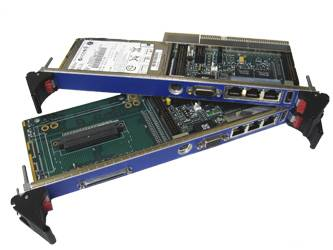
4HP Rear I/O interface for a Compact PCI CPU card | more |
back
Services
Take advantage of our full-service approach
To find out more about our services go to services pages
Customer Section
This section is exclusively for Kontron Customers. After registering you will gain access to
BIOS images, product change notifications (PCNs), 3D models for CAD, and software development
tools.
Click below to login or register.
*Please allow 24 hours to process your confirmation. You will be informed via email when your access to
the customer section is granted.
Click below to login or register.
Login or
register here
register here
*Please allow 24 hours to process your confirmation. You will be informed via email when your access to
the customer section is granted.
