
Venturo Light Rail / Vehicle Management System This product is legacy
Satisfying the Needs of a Mobile World
Specifications
- Hardware Platform fitting to Many Applications
- Flexible Set of Subsystems
- Rugged, Shock & Vibration proof
- EN50155 Compliant & E1 Certified
Satisfying the Needs of a Mobile World
The Venturo Light Rail/Road Vehicle Management System
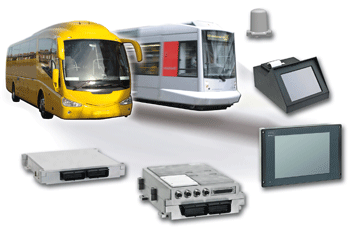
is composed of the following subsystems, for flexible installation on board of the vehicle: Central Management Computer CBox, GSM-Voice& Audio Switch GBox, HMI & Ticket Printer, RFID Badge Reader, and diverse accessories.
1. Venturo CBox
The Venturo CBox is the Central Management Computer - the heart of the system. It takes care of all central computing tasks like data collection and distribution, fleet management, routing, ticket printing, and passenger information. It provides various serial, network and wireless
interfaces to allow data exchange between on board and
external devices.
2. Venturo HMI
The Venturo HMI device is the Driver Human Maschine Interface, making the link between the CBox and the
vehicle driver. It is equipped with an 8.4” color display covered by a touchscreen allowing data entries / acknowledges / selections by the driver.
The Venturo HMI also contains two peripherals:
A ticket printer for the fare printing, a large Vacuum Fluorescent 2-lines alphanumeric display oriented to the passenger to show valuable information (e.g.the due fare).
3. Venturo RFID
The optional Venturo RFID contactless badge reader allows reading of encoded cards according Mifare® DESFIRE (compliant with ISO14443A, ISO15693, ISO 18000-3, NFC enabled, ICODE). It is provided with two card slots secured against ejection due to shocks and vibrations. It is capable of simultaneous reading of two cards without interference and is accepting the permanent presence of the cards in the reader slots without damage for the card and for the reader.
4. Venturo GBox
As a safety accessory, the Venturo GBox (GSM-Voice & Audio) is an independent quad band (850/900/1800/1900 MHz) device capable of storing and running JAVA applications. It’s purpose is to establish an automatic voice
communication link between the vehicle and the ground
station in case of activation of the “emergency button” or
the “distress button” which are connected to the Venturo
GBox via two isolated digital inputs. It is provided with a serial RS422 communication link, allowing connection with the central board computer CBox, and with two isolated digital outputs.
It is also provided with a GSM-controlled audio switch bank, including 2 microphone inputs, 3 line inputs (one internal for the GSM, 2 line outputs (one internal for the GSM), 1 amplified speaker output (5W). This feature allows e.g. audio in/out to the driver’s cab, audio in/out to the passenger compartment, audio in the vehicle radio.
5. Accessories
The optional Vehicle Identification Memory contains unique identification of the vehicle and of it’s configuration.
A GSM antenna associated to the Venturo GBox. A 3-bands antenna associated to the GSM, GPS and WiFi modules contained in the central board computer Venturo CBox.
is composed of the following subsystems, for flexible installation on board of the vehicle: Central Management Computer CBox, GSM-Voice& Audio Switch GBox, HMI & Ticket Printer, RFID Badge Reader, and diverse accessories.
1. Venturo CBox
The Venturo CBox is the Central Management Computer - the heart of the system. It takes care of all central computing tasks like data collection and distribution, fleet management, routing, ticket printing, and passenger information. It provides various serial, network and wireless
interfaces to allow data exchange between on board and
external devices.
2. Venturo HMI
The Venturo HMI device is the Driver Human Maschine Interface, making the link between the CBox and the
vehicle driver. It is equipped with an 8.4” color display covered by a touchscreen allowing data entries / acknowledges / selections by the driver.
The Venturo HMI also contains two peripherals:
A ticket printer for the fare printing, a large Vacuum Fluorescent 2-lines alphanumeric display oriented to the passenger to show valuable information (e.g.the due fare).
3. Venturo RFID
The optional Venturo RFID contactless badge reader allows reading of encoded cards according Mifare® DESFIRE (compliant with ISO14443A, ISO15693, ISO 18000-3, NFC enabled, ICODE). It is provided with two card slots secured against ejection due to shocks and vibrations. It is capable of simultaneous reading of two cards without interference and is accepting the permanent presence of the cards in the reader slots without damage for the card and for the reader.
4. Venturo GBox
As a safety accessory, the Venturo GBox (GSM-Voice & Audio) is an independent quad band (850/900/1800/1900 MHz) device capable of storing and running JAVA applications. It’s purpose is to establish an automatic voice
communication link between the vehicle and the ground
station in case of activation of the “emergency button” or
the “distress button” which are connected to the Venturo
GBox via two isolated digital inputs. It is provided with a serial RS422 communication link, allowing connection with the central board computer CBox, and with two isolated digital outputs.
It is also provided with a GSM-controlled audio switch bank, including 2 microphone inputs, 3 line inputs (one internal for the GSM, 2 line outputs (one internal for the GSM), 1 amplified speaker output (5W). This feature allows e.g. audio in/out to the driver’s cab, audio in/out to the passenger compartment, audio in the vehicle radio.
5. Accessories
The optional Vehicle Identification Memory contains unique identification of the vehicle and of it’s configuration.
A GSM antenna associated to the Venturo GBox. A 3-bands antenna associated to the GSM, GPS and WiFi modules contained in the central board computer Venturo CBox.
Downloads
技术参数
Venturo Vehicle Management System
[ ds_venturo_vehicle_management_system.pdf, 1.23 MB, Aug.31.2017 ]
Datasheet Linux Evaluation Image for Venturo
[ dat_lin_img_ven01_r10_01.pdf, 1 MB, Aug.31.2017 ]
参考手册
Venturo System User Guide, Rev. 1.0, 21.02.2011
[restrictions apply]
[ venturo_date_110221.zip, 3.64 MB, Sep.11.2017 ]
General Safety Instruction
[ general-safety-instructions.pdf, 560.72 KB, Dec.16.2025 ]
Linux
Linux BSP VEN01 R12
候选发布版本(RC) [restrictions apply]
This Board Support package contains drivers, a board library and demo applications. It contains all sources. It is designed for native compilation on the Venturo eval system
md5sum: cd61c9eaadb9b7bcabb4e70eb2249c87
[ lin26-bsp-ven01-r12-tar.bz2, 115 MB, Apr.20.2023 ]
Readme for Linux installation DVD VEN01
Readme for Redhat Fedora Installation DVD. Please download and read this document, before downloading the Installation DVD for Redhat Fedora evaluation image.
[ readme_venturo_fedora_image.pdf, 3.23 MB, Nov.27.2013 ]
Linux Installation DVD VEN01 R12
候选发布版本(RC) [restrictions apply]
This Redhat Fedora Image is designed for the evaluation and demonstration of the capabilites of this system. Burn the Image to a DVD, download and open the appropriate Readme PDF-File. It will guide you through the SW installation process. Finally, the image will be installed into the integrated mass storage devices
md5sum: d6a44f361669bb3564ed0d4fd035fe6e
[ sk-lin-dvd-ven01-r12.iso, 804.77 MB, Aug.05.2014 ]
Services
Kontron Services Brochure
[ kontron-services-brochure.pdf, 8.9 MB, Dec.17.2020 ]
back
Services
Take advantage of our full-service approach
To find out more about our services go to services pages
